

Profile Facebook Twitter My Space Friendster Friendfeed You Tube
Kompas Tempo Detiknews
Google Yahoo MSN
Blue Sky Simple News Simple News R.1 Simple News R.2 Simple News R.3 Simple News R.4
  • Can a browser really make the Web better? Yes ! Download the new Firefox 3.6
  • What Is The Best Browser? All answers

Posts Recentes

Showing posts with label hard Drive. Show all posts

Monday, August 18, 2008 | 8:22 AM | 0 Comments

How to Clean Your Hard Drive


How to Clean Your Hard Drive

First, run Disk Cleanup on your PC. Do this by opening your system tools folder (select Start > All Programs > Accessories > System Tools). To free up the maximum amount of space, check all of the boxes in Disk Cleanup.
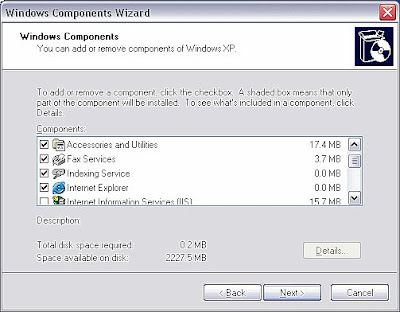


Next, uninstall any unused Windows Components on your PC (select Start > Control Panel. Open Add or Remove Programs . Click the Add/Remove Windows Components button. Select the components you want to remove and click OK). Uninstalling Microsoft games alone will free up over 12MB of memory. Do you use "fax services"? If not, check it off and get rid of it. If you use Internet Explorer, but not MSN Explorer, get rid of it. This will free up almost 14MB of memory. Check off any unused components and watch the memory get replenished to your hard drive.

Finally, get rid of old programs you do not use on your PC. Open your control panel(select Start > Control Panel), Open Add or Remove Programs. Check the dates of when the last time each program was used. Chances are, if it has been over a year since you've used the program, you can trash it. Check all of the programs you wish to remove.

Friday, August 15, 2008 | 7:11 AM | 0 Comments

erase files from a hard drive permanently


There’s two ways to permanently delete data. To permanently erase an entire hard drive including the operating system, you need to get a program that can be burned to a CD so you boot from that and erase the hard drive using the instructions on the CD. There are paid programs for this but for free, you can download Darik’s Boot and Nuke aka DBAN.

Just download it and follow the simple directions to burn a special CD. Then leave the disc in your CD drive and restart your computer. Immediately after it turns on press whatever key it says to load up a boot menu. Usually it’s F12 on modern computers. On an older computer it may be F8. On really, really old computers it can be ESC.

When the boot menu comes up, choose the CD drive and a small mini-operating system will load up and give you options on how to wipe your drive. With most it’s really straightforward. With Darik’s just press F3 to view the types of wiping or just type dod and hit enter. The reason this type of bootable CD, full hard drive wiping works far better than formatting is a little complicated. Basically formatting is like erasing a book’s table of contents but none of the actual text so it looks empty but really isn’t. It leaves the data sitting on the hard drive and says it’s available space to be overwritten. It’s still there until new data actually overwrites it. Bootable hard drive wipers change every single bit on the hard drive to 0 so the data is completely gone.

Of course, the previous method makes the computer totally unusable if you wipe the main system hard drive. This makes it hard to resell because it now has no operating system. Reinstalling Windows is a pain too so it’s only a really common method for businesses that rent computers. Rental companies have other, faster methods of making them useable again. If you want to just permanently delete a couple files and still leave your computer useable, keep reading.

Selective file deletion programs are traditionally called file shredders. A file shredder alternates between overwriting the files you select with all 0’s and all 1’s to make the file even harder to recover. A nice free shredder comes as a separate application with the installer for Spybot Search and Destroy. It’s called the Secure Shredder. You just drag and drop files you want shredded and hit go. It seems to get exponentially slower with large numbers of files though and doesn’t have any progress bar so you never know when it’s going to be done.

That’s a free way to get rid of a couple files quickly but if you regularly need stuff shredded, you’ll probably want to buy a better program for it. Search the web, there’s dozens of good ones out there. All programs work the same way though so either way, your files will be completely unrecoverable.

Thursday, September 27, 2007 | 11:15 AM | 0 Comments

Limit Hard Disk Space to Windows XP Users

Limit hard disk space to users in Windows XP by enabling Quota Management to manage users hard disk space capacity limits.


!!!!!Limit Disk Space To Windows XP Users!!!! - video powered by Metacafe

How to Change your hard Drive icon to your girlfriend photo?

Check this out! You will learn how to change your hard driver icon to your girlfriend's photo in 1 minute...


Change Hard Driver Icon To Your Girlfriend Photo - video powered by Metacafe
 
Copyright © 2010 - All right reserved | Template design by Herdiansyah Hamzah | Published by Jurnalborneo.com
Proudly powered by Blogger.com | Best view on mozilla, internet explore, google crome and opera.